VirtualBoss Construction Scheduling Software
Finding Network Variables
You may need to know some network variables to configure your router or your computer. Here you can discover how to find:

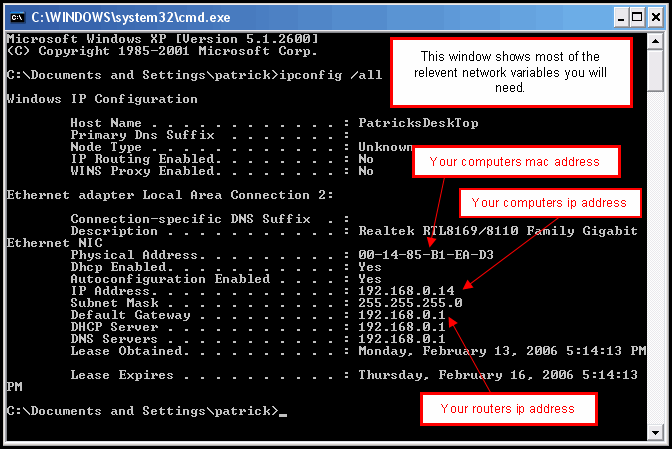
#1 Your computer's IP address
#2 Your computer's MAC address
#3 Your router's IP address / login address

Follow these steps to find #1, #2, and #3:

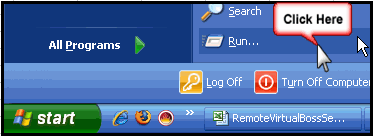
Click on Start, then click Run.


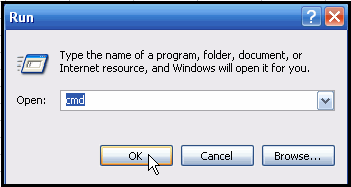
Type "cmd", and click OK.


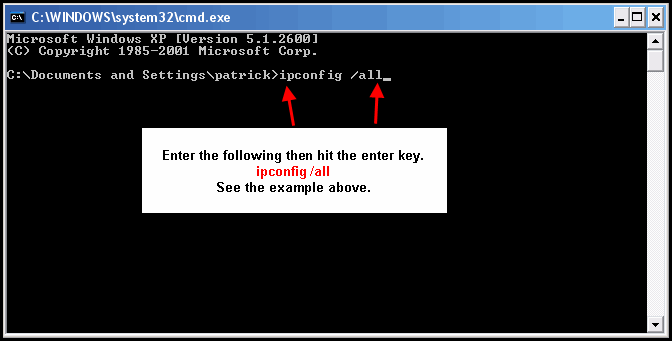
Type "ipconfig /all" as shown below, and hit the Enter key.


Your network variables will display, as shown in the example below.


You can also determine many of these variables by logging into your router and viewing some of the information there. However, the above method is more direct and does not require you to know the IP address, user name, and password of your router. You may actually need to use the above method just to determine the IP address of your router.

If you have a Pro or Enterprise Support Plan, contact our service department and we will set this up for you.

If you have any comments, questions, or suggestions, please let us know at service@virtualboss.net. Please include your contact information.

Return to the main help page for Remote VirtualBoss