



Using an Existing Web Server for Remote VirtualBoss
If you have a Pro or Enterprise Support Plan, contact our service department and we will set up everything for you.
If you plan on using an already configured / functioning web server (that you do not want reconfigured), follow the instructions below. You must have full control of your server and have the ability to add and remove programs. If you are using an outside provider to host your website, they will more than likely not give you the ability to add and remove programs. The best thing to do is use a basic PC at your location to host Remote VirtualBoss and make a link on your business website that points to it. For example, you could make a hyperlink on your website that says Job Scheduling that points to your Remote VirtualBoss domain. It is a good idea to keep your Remote VirtualBoss server on your local area network so you can access the VirtualBoss data with PC VirtualBoss.
If you are going to use an existing IIS web server that you do not want reconfigured, follow these steps. When you are on the "Web server setup" page during the Remote VirtualBoss install process, select the option that says "My web server is already set up".
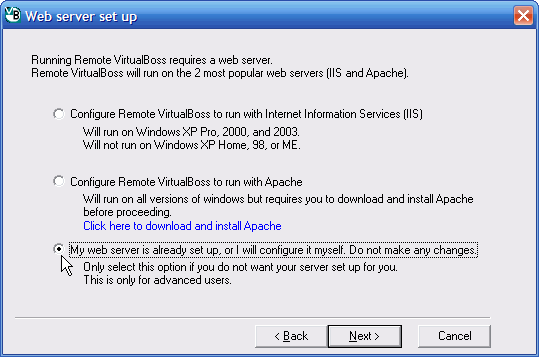
When you are finished installing Remote VirtualBoss, you can view your Remote VirtualBoss website by going to http://localhost/remotevb (if you have a functioning website, you will go to www.yourwebsite.com/remotevb). This works because a virtual directory called remotevb is created and placed within your website. This works very similar to a standard setup, except index.htm (that redirects to /remotevb) is not created.
If you are going to use an existing Apache web server that you do not want reconfigured, follow these steps.
When you are on the "Web server setup" page during the Remote VirtualBoss install, select the option that says "Configure Remote VirtualBoss to run with Apache".
The install process will make a virtual directory called /remotevb and place it within your website. This process will create or overwrite index.html.en in the root directory of your web server (i.e., C:\Program Files\Apache Group\Apache2\htdocs\index.html.en will be overwritten by the Remote VirtualBoss install program).
If you are using this file for your website (index.html.en is a important webpage), you need to be careful and make sure you preserve this page. In most cases index.html.en is a generic/default "getting started" page for new Apache installs. If you overwrite this default page, it can easily be replaced. You can tell if you are using this page for anything important by going to http://localhost/index.html.en in a web browser. If you see that http://localhost/index.html.en is being used for something important, you should do 1 of 2 things.
1. Rename index.html.en to index.html. In this case, index.html will be the default page for your website.
or
2. Make a backup copy of index.html.en and restore it after you have completed the Remote VirtualBoss installation.
To view your Remote VirtualBoss webpage, go to http://localhost/remotevb (or www.yourwebsite.com/remotevb, if you have a functioning website).
If you have a Pro or Enterprise Support Plan, contact our service department and we will set up everything for you.
If you have any comments, questions, or suggestions, please let us know at service@virtualboss.net.Please include your contact information.
Return to the main help page for Remote VirtualBoss